Nightly scores card, posted by a GitHub Action
What you'll build: a script that pulls one night's scores from ESPN, draws them as a 1080 × 1350 PNG card in each team's colours with its logo, and a GitHub Actions workflow that runs it every morning and keeps the PNG as a build artifact. It's the image a league or team account posts each day, made without anyone opening an editor.
This needs sportsdataverse ≥ 4.0.0 and @sportsdataverse/sdvplot ≥ 0.1.0
(plot.sportsdataverse.org). Neither is on npm
yet: until they are, run the script from this repo against a local sdvplot-js
build, as described in the shot chart tutorial. The
workflow below installs both from npm, so it works once they are published.
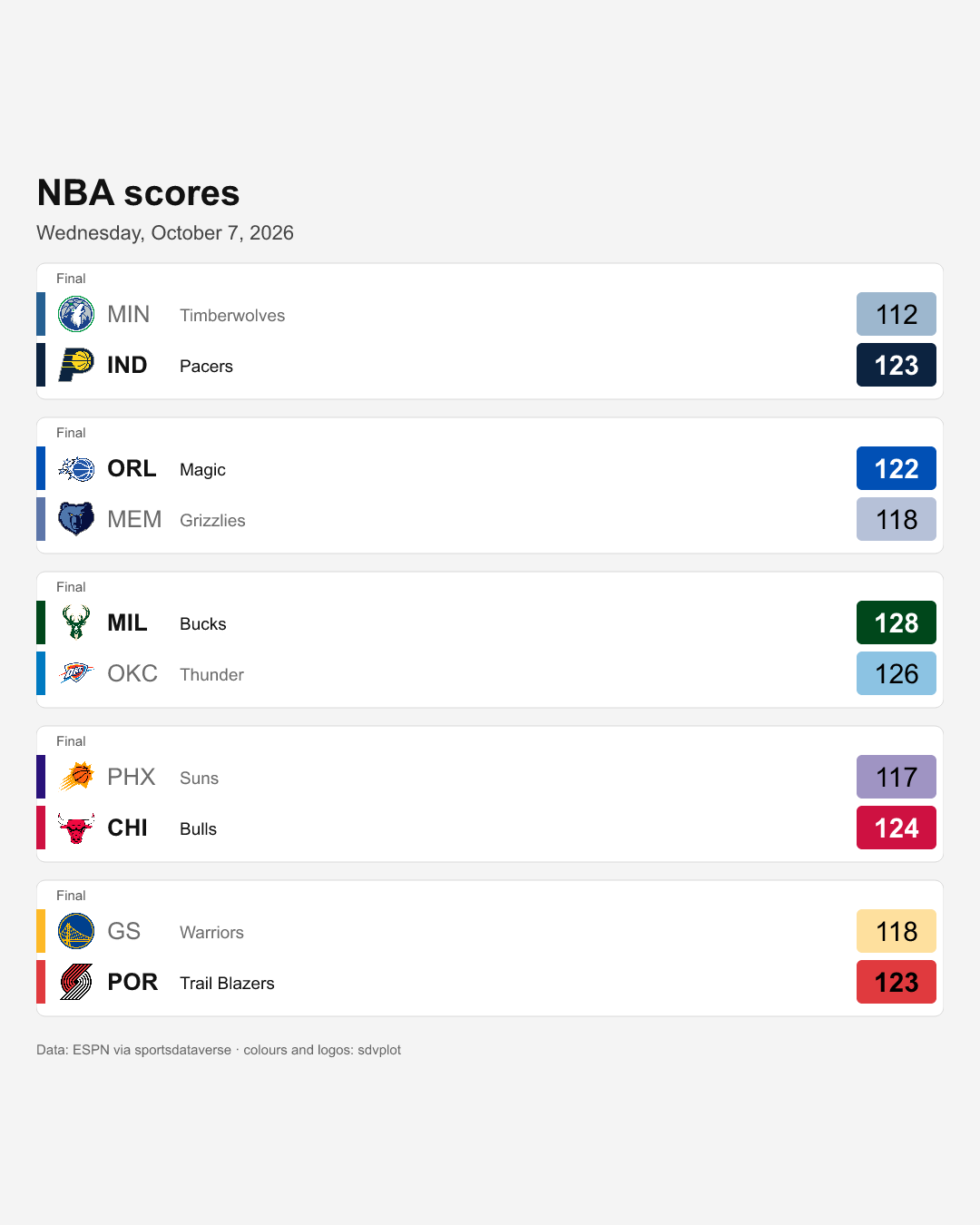
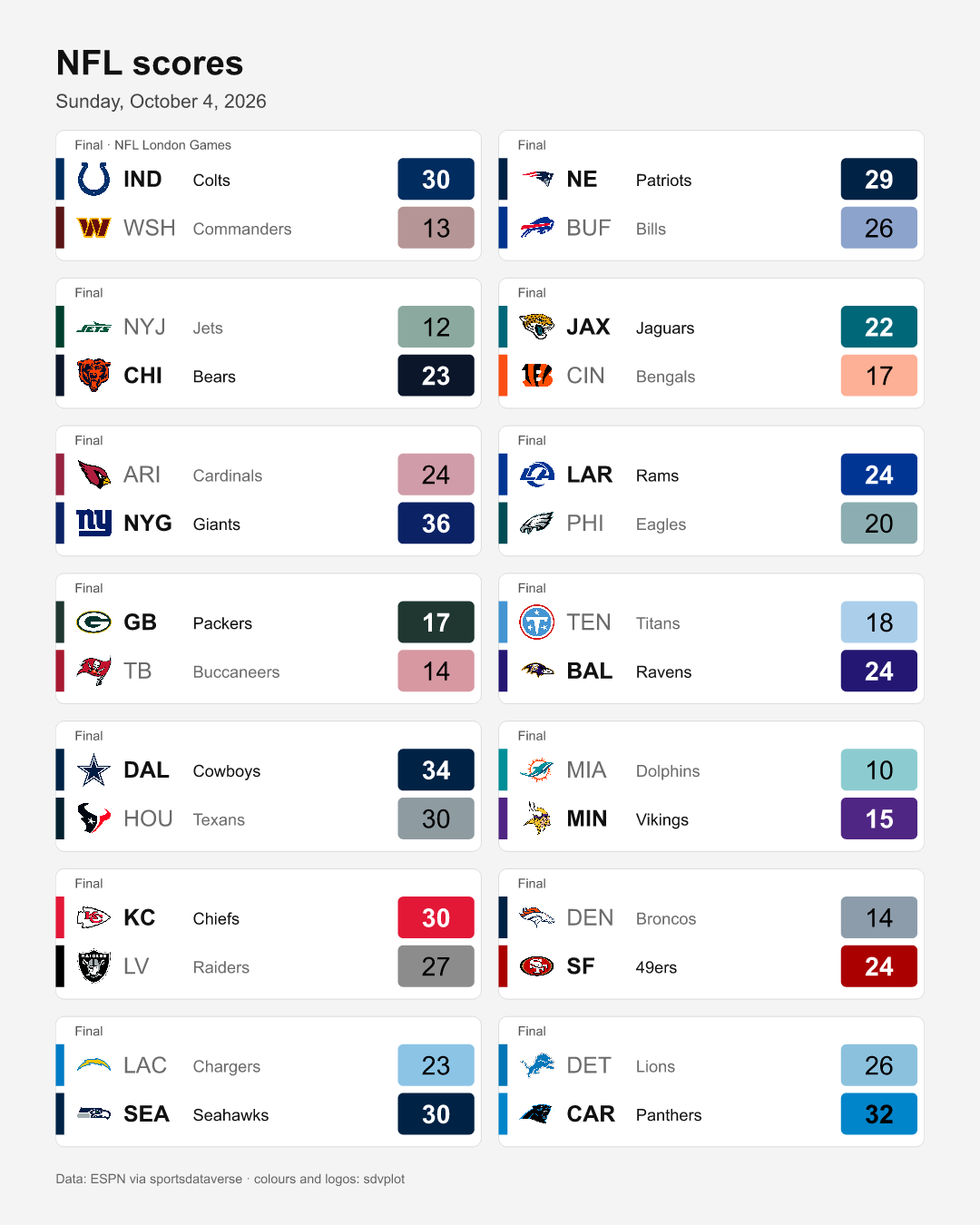
Both cards are real runs against live ESPN data on 2026-10-08:
DATE=2026-10-07 (NBA preseason, the default league) and
LEAGUE=nfl DATE=2026-10-04 (an NFL Sunday, which switches to two columns).
Sources used
| Source | Host | Call |
|---|---|---|
| ESPN Site API v2 | site.api.espn.com/apis/site/v2/sports/basketball/nba/scoreboard?dates=YYYYMMDD | sdv.nba.espnNbaScoreboard({ dates, parsed: true }) (or another league's espn<League>Scoreboard) |
@sportsdataverse/sdvplot | (library; bundled team index, no network) | palette(league, ids, { idSystem: 'espn' }), logoUrl(id, league, { idSystem: 'espn' }), onColor, mix |
@sportsdataverse/sdvplot/export | (library) + the logo CDN for <image> downloads | socialCard(svg, { aspect: '4:5' }), toPNG(svg, { width: 1080 }) |
@resvg/resvg-js | (native rasterizer, optional peer of sdvplot) | used by toPNG |
Offline fixture: test/fixtures/espn/scoreboard_nba.json (the night of
2024-12-01). The docs build runs the script against it; the cards above come
from live runs.
How the script works
Which night. A morning job wants the night before, and US sports nights
are Eastern time. The script's default DATE is yesterday in
America/New_York; pass DATE=YYYY-MM-DD for any other night and
LEAGUE=nfl (or wnba, mlb, nhl, cfb, mbb, wbb) for another league.
The subtitle is not taken from DATE: it is the Eastern date of the first
game's start time, read from the rows. If the label and the data ever disagree,
it's the data you see.
The scores. espn<League>Scoreboard({ dates, parsed: true }) returns one
row per game, with away_* / home_* columns: _abbreviation, _name,
_score, _winner, _id, plus status_type_short_detail (Final,
Final/OT, a tip-off time for a game not yet played) and note (a playoff
round, a neutral-site series). A night with no games prints one line and writes
nothing, so the workflow below finishes green without an artifact. A college
Saturday has 50-plus games: MAX (default 16) caps the card, and its footer
says how many were left out.
Team identity. palette(league, ids, { idSystem: 'espn' }) maps each ESPN
team id to its primary colour from sdvplot's bundled index, and logoUrl gives
the archived logo URL. Both are lookups, with no network. If sdvplot doesn't
know a team, the script falls back to ESPN's own *_color and *_logo. onColor
picks black or white for the score text, and mix(colour, '#ffffff', 0.55)
fades the loser's score box. onColor is computed on the faded colour, so the
loser's score stays readable.
The card. It is a plain SVG built from template strings: one tile per
game, away over home, a colour bar, the logo, the abbreviation and name, and
the score in a box filled with the team colour. A card is a layout, not a
chart, so a plotting library would add nothing. socialCard(svg, { aspect: '4:5' })
pads it onto a portrait canvas without cropping, and toPNG(card, { width: 1080 })
rasterizes it at 1080 × 1350. toPNG downloads each remote <image> (the logos)
with Node's fetch. Node has no CORS, so any logo host works.
Fonts. resvg draws text only with fonts it can find, through fontconfig on
Linux. With none it skips the text without an error, and the card comes out as
coloured boxes. The script asks for DejaVu Sans, then Liberation Sans,
Arial and Helvetica, and the workflow makes sure DejaVu is installed.
Offline vs live. In this repo the script runs offline by default
(examples/_offline.mjs serves the committed fixture, and the logos are left
out). SDV_LIVE=1 uses the real hosts. In your own repo the workflow sets
SDV_LIVE=1, so the _offline.mjs import never runs and you don't need that
file.
The script
// 93 — Nightly scores card: one night's ESPN scoreboard → a team-coloured PNG, built to run in a GitHub Action.
//
// Shows: `espn<League>Scoreboard({ dates, parsed: true })` (one row per game) drawn as a
// plain SVG scores card with @sportsdataverse/sdvplot `palette` (team colours by ESPN id),
// `logoUrl` (archived logo URL) and `onColor` (black or white text on a colour), framed by
// `socialCard` (4:5 portrait) and rasterized by `toPNG` (optional peer @resvg/resvg-js,
// which downloads the logos with Node's fetch). Writes out/scores_card.png + scores_card.json
// next to this script.
//
// Inputs (env): LEAGUE = nba (default) | wnba | nfl | mlb | nhl | cfb | mbb | wbb
// DATE = YYYYMMDD or YYYY-MM-DD; default: yesterday in America/New_York
// MAX = most games on one card (default 16; a college Saturday has 50+)
// SDV_LIVE=1 hits the real hosts (ESPN + the logo CDN); the repo's docs build runs it
// offline against the committed fixture instead (examples/_offline.mjs, logos skipped).
// The workflow template is examples/workflows/scores-card.yml.
//
// Sources: ESPN Site API v2 — site.api.espn.com/apis/site/v2/sports/basketball/nba/scoreboard?dates=YYYYMMDD
// Offline fixture: test/fixtures/espn/scoreboard_nba.json (the night of 2024-12-01).
import { mkdirSync, writeFileSync } from 'node:fs';
import sdv from 'sportsdataverse';
import { logoUrl, mix, onColor, palette } from '@sportsdataverse/sdvplot';
import { socialCard, toPNG } from '@sportsdataverse/sdvplot/export';
const LIVE = process.env.SDV_LIVE === '1';
if (!LIVE) await import('./_offline.mjs').then((m) => m.setup()); // repo-only: serve committed fixtures
const LEAGUE = (process.env.LEAGUE || 'nba').toLowerCase();
const ET = 'America/New_York';
function yesterdayET() {
const today = new Intl.DateTimeFormat('en-CA', { timeZone: ET }).format(new Date()); // YYYY-MM-DD
const d = new Date(`${today}T12:00:00Z`);
d.setUTCDate(d.getUTCDate() - 1);
return d.toISOString().slice(0, 10).replaceAll('-', '');
}
const DATE = (process.env.DATE || yesterdayET()).replaceAll('-', '');
if (!/^\d{8}$/.test(DATE)) throw new Error(`DATE must be YYYYMMDD or YYYY-MM-DD, got ${process.env.DATE}`);
const scoreboard = sdv[LEAGUE]?.[`espn${LEAGUE[0].toUpperCase()}${LEAGUE.slice(1)}Scoreboard`];
if (!scoreboard) throw new Error(`no ESPN scoreboard for LEAGUE=${LEAGUE}`);
const all = (await scoreboard({ dates: DATE, parsed: true })).sort((a, b) => a.date.localeCompare(b.date));
const games = all.slice(0, Number(process.env.MAX) || 16);
if (games.length === 0) {
console.log(`no ${LEAGUE.toUpperCase()} games on ${DATE}; nothing to draw`);
process.exit(0);
}
// Colours and logos from sdvplot by ESPN team id; ESPN's own colour/logo fields are the fallback.
const ids = [...new Set(games.flatMap((g) => [g.away_id, g.home_id]))];
const colors = await palette(LEAGUE, ids, { idSystem: 'espn' });
const logos = Object.fromEntries(await Promise.all(ids.map(async (id) => [id, await logoUrl(id, LEAGUE, { idSystem: 'espn' })])));
const side = (g, s) => ({
abbr: g[`${s}_abbreviation`],
name: g[`${s}_name`],
score: g.status_type_state === 'pre' ? '' : (g[`${s}_score`] ?? ''), // ESPN sends "0" before tip-off
winner: g[`${s}_winner`] === true,
color: colors[g[`${s}_id`]] ?? `#${g[`${s}_color`] || '777777'}`,
logo: logos[g[`${s}_id`]] ?? g[`${s}_logo`],
});
// The night the games belong to, read from the data (first tip-off in Eastern time), not from DATE.
const night = new Intl.DateTimeFormat('en-US', { timeZone: ET, weekday: 'long', month: 'long', day: 'numeric', year: 'numeric' }).format(new Date(games[0].date));
console.log(`## ${LEAGUE.toUpperCase()} scores, ${night}`);
console.log('| away | score | home | status | away colour | home colour |');
console.log('| --- | --- | --- | --- | --- | --- |');
for (const g of games) {
const [a, h] = [side(g, 'away'), side(g, 'home')];
console.log(`| ${a.abbr} | ${a.score}-${h.score} | ${h.abbr} | ${g.status_type_short_detail} | ${a.color} | ${h.color} |`);
}
// --- The card: a plain SVG, one tile per game, two rows per tile (away over home). ---
const FONT = "font-family=\"'DejaVu Sans', 'Liberation Sans', Arial, Helvetica, sans-serif\"";
const esc = (s) => String(s).replace(/&/g, '&').replace(/</g, '<').replace(/"/g, '"');
const W = 1000;
const COLS = games.length > 6 ? 2 : 1;
const GAP = 20;
const ROW = 56;
const TILE_W = (W - GAP * (COLS - 1)) / COLS;
const TILE_H = 30 + 2 * ROW + 8;
const TOP = 110;
const rowsOfTiles = Math.ceil(games.length / COLS);
const H = TOP + rowsOfTiles * (TILE_H + GAP) + 30;
// Text is not measured: widths are rough per-character estimates, generous enough for DejaVu Sans (wider than Arial).
const ABBR_W = Math.max(80, 19 * Math.max(...games.flatMap((g) => [g.away_abbreviation.length, g.home_abbreviation.length])) + 14);
const fit = (text, size, chars) => (String(text).length > chars ? Math.floor((size * chars) / String(text).length) : size);
function teamRow(t, x, y, loser) {
const ink = loser ? '#6b6b6b' : '#111111';
const weight = loser ? 400 : 700;
const box = loser ? mix(t.color, '#ffffff', 0.55) : t.color; // the loser's score box fades toward white
return (
`<rect x="${x}" y="${y + 4}" width="10" height="${ROW - 8}" fill="${t.color}"/>` +
(t.logo ? `<image href="${esc(t.logo)}" x="${x + 22}" y="${y + 6}" width="${ROW - 12}" height="${ROW - 12}"/>` : '') +
`<text x="${x + ROW + 22}" y="${y + 37}" ${FONT} font-size="26" font-weight="${weight}" fill="${ink}">${esc(t.abbr)}</text>` +
`<text x="${x + ROW + 22 + ABBR_W}" y="${y + 36}" ${FONT} font-size="${fit(t.name, 19, 16)}" fill="${ink}">${esc(t.name)}</text>` +
`<rect x="${x + TILE_W - 96}" y="${y + 4}" width="88" height="${ROW - 8}" rx="6" fill="${box}"/>` +
`<text x="${x + TILE_W - 52}" y="${y + 39}" ${FONT} font-size="30" font-weight="${weight}" text-anchor="middle" fill="${onColor(box)}">${esc(t.score)}</text>`
);
}
const tiles = games.map((g, i) => {
const x = (i % COLS) * (TILE_W + GAP);
const y = TOP + Math.floor(i / COLS) * (TILE_H + GAP);
const [a, h] = [side(g, 'away'), side(g, 'home')];
const done = g.status_type_completed === true;
const note = [g.status_type_short_detail, g.note].filter(Boolean).join(' · ');
return (
`<rect x="${x}" y="${y}" width="${TILE_W}" height="${TILE_H}" rx="10" fill="#ffffff" stroke="#d9d9d9"/>` +
`<text x="${x + 22}" y="${y + 22}" ${FONT} font-size="15" fill="#555555">${esc(note)}</text>` +
teamRow(a, x, y + 28, done && h.winner) +
teamRow(h, x, y + 28 + ROW, done && a.winner)
);
});
const svg =
`<svg xmlns="http://www.w3.org/2000/svg" width="${W}" height="${H}" viewBox="0 0 ${W} ${H}">` +
`<rect width="${W}" height="${H}" fill="#f4f4f4"/>` +
`<text x="0" y="46" ${FONT} font-size="40" font-weight="700" fill="#111111">${LEAGUE.toUpperCase()} scores</text>` +
`<text x="0" y="84" ${FONT} font-size="22" fill="#444444">${esc(night)}</text>` +
tiles.join('') +
`<text x="0" y="${H - 8}" ${FONT} font-size="15" fill="#666666">${all.length > games.length ? `First ${games.length} of ${all.length} games by start time · ` : ''}Data: ESPN via sportsdataverse · colours and logos: sdvplot</text>` +
`</svg>`;
// 4:5 portrait card (1080 x 1350 at width 1080), the shape social feeds crop least.
const png = await toPNG(socialCard(svg, { aspect: '4:5', padding: 40, background: '#f4f4f4' }), {
width: 1080,
images: LIVE ? 'fetch' : 'skip',
});
const out = new URL('./out/', import.meta.url);
mkdirSync(out, { recursive: true });
writeFileSync(new URL('scores_card.png', out), png);
writeFileSync(
new URL('scores_card.json', out),
`${JSON.stringify({ league: LEAGUE, date: DATE, night, games: games.map((g) => ({ game_id: g.game_id, away: side(g, 'away'), home: side(g, 'home'), status: g.status_type_short_detail })) }, null, 2)}\n`
);
console.log(`\nwrote out/scores_card.png (${games.length} games, ${png.length} bytes) + out/scores_card.json`);
Output
Output of node examples/93_scores_card_action.mjs (offline, against the committed fixtures):
## NBA scores, Sunday, December 1, 2024
| away | score | home | status | away colour | home colour |
| --- | --- | --- | --- | --- | --- |
| ORL | 100-92 | BKN | Final | #0150b5 | #000000 |
| IND | 121-136 | MEM | Final | #0c2340 | #5d76a9 |
| BOS | 111-115 | CLE | Final | #008348 | #860038 |
| NO | 85-118 | NY | Final | #0a2240 | #1d428a |
| MIA | 116-119 | TOR | Final | #98002e | #d91244 |
| OKC | 116-119 | HOU | Final | #007ac1 | #ce0e2d |
| LAL | 105-104 | UTAH | Final | #552583 | #4e008e |
| DAL | 137-131 | POR | Final | #0064b1 | #e03a3e |
| SA | 127-125 | SAC | Final | #000000 | #5a2d81 |
| DEN | 122-126 | LAC | Final | #0e2240 | #12173f |

wrote out/scores_card.png (10 games, 95079 bytes) + out/scores_card.json
Run it every morning with GitHub Actions
This workflow is a template. It lives at
examples/workflows/scores-card.yml,
not in .github/workflows/, so it never runs in this repo.
# Nightly scores card: a template for YOUR repository
# (it is not active in sportsdataverse-js). Copy it to
# .github/workflows/scores-card.yml, and examples/93_scores_card_action.mjs
# to scripts/scores-card.mjs. No secrets needed. Tutorial:
# https://js.sportsdataverse.org/docs/tutorials/sdvplot-scores-card
name: Nightly scores card

on:
  schedule:
    # Cron is UTC, with no daylight saving: 09:00 UTC is 05:00 EDT / 04:00 EST,
    # after the night's last West Coast game has gone final.
    - cron: '0 9 * * *'
  workflow_dispatch:
    inputs:
      league:
        description: 'ESPN league: nba, wnba, nfl, mlb, nhl, cfb, mbb or wbb'
        default: nba
      date:
        description: 'YYYY-MM-DD; empty means yesterday in US Eastern time'
        default: ''

permissions:
  contents: read

jobs:
  card:
    runs-on: ubuntu-latest
    timeout-minutes: 10
    steps:
      - uses: actions/checkout@fbc6f3992d24b796d5a048ff273f7fcc4a7b6c09 # v5.1.0
      - uses: actions/setup-node@a0853c24544627f65ddf259abe73b1d18a591444 # v5.0.0
        with:
          node-version: 22
      # resvg finds fonts through fontconfig; with none it draws no text at all
      - name: Make sure a text font is installed
        run: |
          fc-list | grep -qi dejavu || {
            sudo apt-get update -q
            sudo apt-get install -y -q fontconfig fonts-dejavu-core
          }
      - name: Install sportsdataverse, sdvplot and the resvg rasterizer
        run: >-
          npm install --no-save --no-package-lock
          sportsdataverse@^4.0.0
          @sportsdataverse/sdvplot@^0.1.0
          @resvg/resvg-js@^2.6.2
      - name: Render the card
        env:
          SDV_LIVE: '1' # real ESPN + logo CDN (the docs build runs it offline)
          LEAGUE: ${{ inputs.league || 'nba' }}
          DATE: ${{ inputs.date }}
        run: node scripts/scores-card.mjs
      - uses: actions/upload-artifact@ea165f8d65b6e75b540449e92b4886f43607fa02 # v4.6.2
        with:
          name: scores-card-${{ github.run_id }}
          path: scripts/out/
          if-no-files-found: ignore # an off night writes nothing
          retention-days: 14
      # Optional, NOT part of the verified template: post the PNG to Discord.
      # Create a channel webhook, store its URL as the repository secret
      # DISCORD_WEBHOOK_URL, then uncomment:
      # - name: Post to Discord
      #   if: hashFiles('scripts/out/scores_card.png') != ''
      #   env:
      #     DISCORD_WEBHOOK_URL: ${{ secrets.DISCORD_WEBHOOK_URL }}
      #   run: curl -fsS -F "file=@scripts/out/scores_card.png" "$DISCORD_WEBHOOK_URL"
Turn it on in your repository
- Save the script above as
scripts/scores-card.mjsin your repository. - Save the workflow as
.github/workflows/scores-card.yml. - Commit both to the default branch. GitHub runs scheduled workflows only from the default branch.
- Try it by hand: Actions → Nightly scores card → Run workflow. Pick a league and a date that had games.
- Open the finished run and download the
scores-card-<run id>artifact. It holdsscores_card.pngandscores_card.json(the rows behind the image, handy for the post's text).
Secrets: none. ESPN's public API needs no key, and the logos are public
URLs. The workflow's token only needs contents: read, for the checkout. You
need a secret only if you add a posting step.
The schedule. cron: '0 9 * * *' has five fields: minute, hour,
day-of-month, month, day-of-week. This one means 09:00 every day. Cron in
Actions is always UTC and does not follow daylight saving, so 09:00 UTC is
05:00 in the summer and 04:00 in the winter on the US East Coast, late enough
for every West Coast game. To post at a fixed local time, accept the one-hour
seasonal shift or keep two schedules. GitHub can start a scheduled run several
minutes late when its runners are busy, and in a public repository it disables
the schedule after 60 days with no activity; re-enable it from the Actions tab.
Posting it. The commented Post to Discord step sends the PNG to a
channel webhook (DISCORD_WEBHOOK_URL repository secret). It is shown as a
starting point; it has not been run as part of this tutorial. The workflow
uploads the image as an artifact rather than committing it, because a daily
image commit fills a repository's history with binaries.
What was verified
- The script was run live against ESPN on 2026-10-08, which produced the cards on this page.
- The workflow's steps were repeated on Linux (Ubuntu 22.04, Node 22) in an
empty directory:
npm install --no-save --no-package-lockof the two packages, from localnpm packtarballs since neither is published yet, plus@resvg/resvg-js@^2.6.2from npm;- then
SDV_LIVE=1 LEAGUE=nba DATE= node scripts/scores-card.mjs.
- On that machine, without fontconfig, the first card had no text. That is why
the workflow has its font step. With DejaVu and a fontconfig file pointing at
it (standing in for the
apt-getstep, which needs root), the card matched the one above. actionlint(with shellcheck) passes on the workflow, including the commented Discord step uncommented.- The workflow itself has not run on GitHub's runners. It can't until both packages are on npm.
Next
- Weekly power-rankings ladder: the same pattern on a weekly schedule.
- sdvplot's export functions (
toPNG,socialCard,toSVG) are documented at plot.sportsdataverse.org.